Loading...
Searching...
No Matches
Camera (DATA_CAMERA)
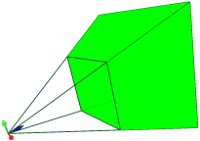
Camera Datatype Information
OpenFlipper includes a data type "DATA_CAMERA" for visualizing cameras. A camera consists of the modelview and the projection matrix. Additionally it requires the aspect ratio and the near/far plane distances.
Usage
To use the dataType, create an empty object of type DATA_CAMERA
// Variable which will store the id of the newly created object.
int newObjectId = -1;
// Emit the signal, that we want to create a new object of the specified type DATA_CAMERA
emit addEmptyObject(DATA_CAMERA, newObjectId);
// Get the newly created object
if(object) {
// Get the node
CameraNode* cameraNode = object->cameraNode();
// ...
} else {
// Something went wrong when creating the object.
std::cerr << "Unable to create object" << std::endl;
}
Definition CameraNode.hh:90
Definition CameraObject.hh:82
bool getObject(const int _identifier, BaseObject *&_object)
Get the object which has the given identifier.
Definition PluginFunctions.cc:298
Now that you have the camera node, you have to set some variables.
- Set the Modelview Matrix: CameraNode::setModelView()
- Set the projection Matrix: CameraNode::setProjection()
- Set near and far plane: CameraNode::setFarPlane(), CameraNode::setNearPlane()
- Aspect ration of the setup: CameraNode::setAspectRation()
This will setup all required parameters of your camera. Don't forget to call
emit updatedObject(cameraObject->id(),UPDATE_ALL);
to make your changes visible.
